How to Use the Conversion Report on Involve Asia Advertiser Dashboard
The Conversion Report helps you track and analyze your affiliate program’s conversions directly from your dashboard. You can filter by date, offer, status, and more — and even export your data for further review.
Step 1: Access the Conversion Report
Log in to your Advertiser Dashboard, hover over “Reports” in the navigation bar, and select “Conversion Report.”
Illustration purposes only
Use the basic filters to search by:
Date Range
Offer
Offer Status
Step 2: Use Advanced Filters
If you need more details, click “More Options” to apply advanced filters.
Illustration purposes only
Advanced filters include:
Publisher
Order ID
Conversion ID
Offer Payment Status
Publisher Payment Status
Offer’s Local Currency
Campaigns
Step 3: Customize Your Report
You can further customize your report to focus on the most relevant data. Options include:
Campaigns
Currency
Status
Offer Sub ID
Publisher Sub ID
Once ready, click “Search.”
Step 4: Export Your Report
After reviewing the data, download your report by clicking the “Export CSV” button.
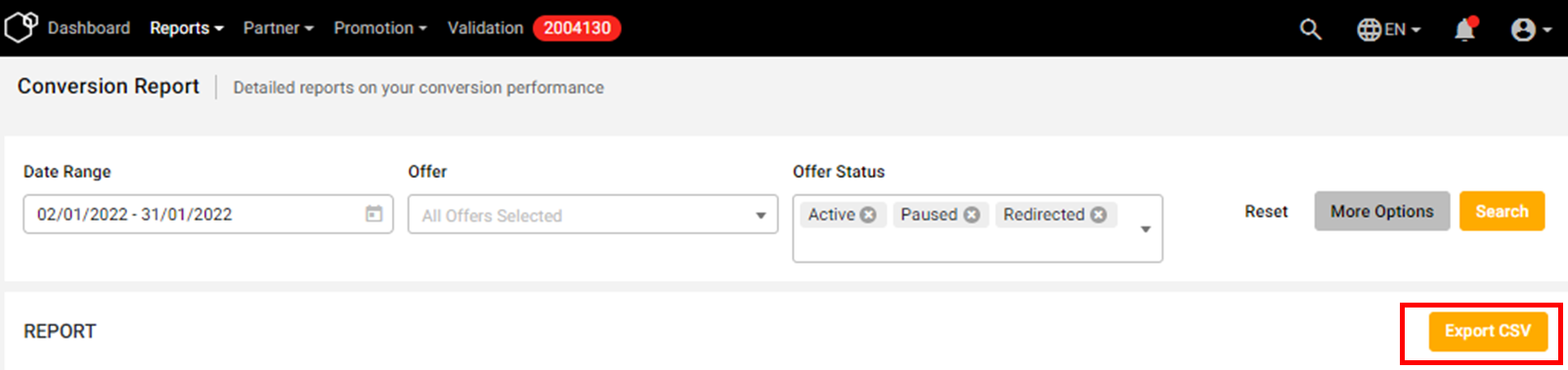 Illustration purposes only
The Conversion Report is a powerful tool to track conversions, verify performance, and manage payouts — giving you full visibility over your affiliate campaigns.